Posts

Lambda function to tag all available snapshots

Following Lambda function will add a defined tag(s) to all available EBS snapshots. Lambda function should be associated with an IAM Role with necessary permissions. E.g with EC2FullAccess permissions. from __future__ import print_function import json import boto3 import logging #setup simple logging for INFO logger = logging.getLogger() logger.setLevel(logging.ERROR) #define the connection region ec2 = boto3.resource('ec2', region_name="eu-west-2") ec = boto3.client('ec2', 'eu-west-2') snapshots = ec.describe_snapshots(MaxResults=1000,OwnerIds=['put account id here'])['Snapshots'] #Set this to True if you don't want the function to perform any actions debugMode = False def lambda_handler(event, context): for snapshot in snapshots: print('Sanpshot id '+snapshot['SnapshotId']) snapshotx = ec2.Snapshot(snapshot['SnapshotId']) snapshotx.create_tags(Tags=[{'Key': 'T...

Hostname and mail configurations in Linux

By default mail command will set the from address as $user@$hostname in Linux. If you want to change this behavior using the configuration file (/etc/mail.rc ) this is how it can be done. Set the entire from address like below. Add this to the configuration file. set from="from address" If you need to change the hostname part only, add this. set hostname="hostname"

Getting abbreviated name with daylight saving of a timezone in Java 8

Recently I wanted to get the timezone abbreviation of a timezone as a string. There are many tutorials which cover that. But in all those, timezone is given in one of the following formats. "America/Los-Angeles" or "PT". But I needed to get the abbreviation with the daylight saving such as "PST" or "PDT". Finally, I was able to get it using the following method. ZonedDateTime currentTime; boolean isDayLightSavingEnabled =currentTime.getZone().getRules().isDaylightSavings(currentTime.toInstant()); TimeZone timeZone = TimeZone.getTimeZone(currentTime.getZone()); String timeZoneName = timeZone.getDisplayName(isDayLightSavingEnabled, TimeZone.SHORT); System.out.println( timeZoneName); Output will be PST

Fix issues in upgrading Ubuntu 14.04 to 16.04

When I upgraded my Ubuntu 14.04 PC to 16.04 it restarted and terminal screen was loaded without any GUI. I fixed this by doing following steps. First login with by entering login name(this is your username) and password Run sudo apt-get update If above step fails run the command which is given in the error. Usually this is something related to dpkg. Run sudo apt-get upgrade -f If confirmations occurs while upgrading accept all After upgrading is done restart the computer. If it still goes to terminal run sudo do-release-upgrade

Accessing all highcharts in a page at once

Recently I needed to call a reflow method of all hi-charts in the page for a particular event. I used following method for that. function redrawHighcharts() {     for (var i = 0; i < Highcharts.charts.length; i++) {         Highcharts.charts[i].reflow();     } }

Fixing Unicode issues in Pentaho CDA

Recently I encountered problem when sending a query parameter with unicode text to Pentaho CDA. For these type of queries CDA returns an empty result set although there are matching items. After some research I fixed this issue by adding an additional parameter to the JDBC connection url. Now JDBC connection is like below. <DataSources>         <Connection id="1" type="sql.jdbc">             <Driver>com.mysql.jdbc.Driver</Driver>             <Url>jdbc:mysql://host:3306/DB?useUnicode=true&amp;characterEncoding=UTF-8</Url>             <User>user</User>             <Pass>pass</Pass>         </Connection>  </DataSources>

Creating a Pentaho BI server cluster

Image
Note - This is applicable to Pentaho BI server community edition 5.x only. Pentaho BI server provides a large set of features which are essential for  BI applications. To use this in production we might need to create a CDA cluster to maintain high availability as well as load balancing. To create a cluster we need to configure BI server instances to use a common data source to store configurations. I configured the following setup for this. Follow these steps to create the cluster. Install MySQL servers and setup master master replication. Make sure you have installed Oracle Java 7 in all nodes. Using other java versions will cause runtime errors. Follow  this  document to to install a CDA instance. Make sure to follow the document named "Install with Your Own BA Repository" and follow the configurations related to MySQL.  Start the server and install all the components needed. Modify the cluster documentation as mentioned in this document.  htt...

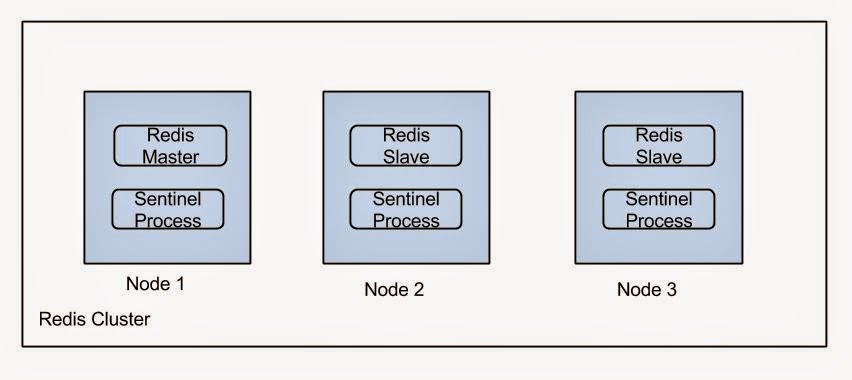
Deploying a HA Redis setup

Image
Sentinel process takes the responsibility of electing a slave as master if a failure occurs. For more information refer  this . Install Redis in each node. Following methods can be used to install Redis. Using Ubuntu repositories.  sudo apt-get install redis-server Manual installation You can download a Redis distribution from this page  http://redis.io/download . Follow the instructions on this page to setup Redis using the downloaded setup  https://www.digitalocean.com/community/tutorials/how-to-install-and-use-redis Set requirepass property to set the password in the configuration file in /etc/redis. Note that this should be same in all nodes. Set Up replication Set the following properties to set replication on slaves. slaveof <masterip> <m...

Bind a remote server's port to a local port

If you have a remote server (say in Amazon EC2) you might want to access a particular port of that server. But there can be situations where it is not that port is not globally open. If you do not want to bother making it globally open you can use it by binding it to a local port of your workstation via ssh. Following command will bind port 9000 of remote machine to your local port 8000.  As an example if it is web server you can easily access it by typing localhost:8000 in your web browser. ssh -L 8000:localhost:9000 username@host

Implementing session timeout in playframework

According to play documentation " There is no technical timeout for the Session. It expires when the user closes the web browser. If you need a functional timeout for a specific application, just store a timestamp into the user Session and use it however your application needs (e.g. for a maximum session duration, maximum inactivity duration, etc.)." So I used the following way to implement a session timeout. Following custom authenticator class was used to implement this. public class ValidateUserSessionAction extends Security.Authenticator{ @Override public String getUsername(Http.Context ctx) { long currentTime=System.currentTimeMillis(); long timeOut=Long.parseLong(Play.application().configuration().getString("sessionTimeout")) * 1000 * 60; String temp=ctx.session().get(Constants.LAST_SEEN_KEY); if (temp == null) { temp = String.valueOf(currentTime); } if((currentTime-Long.parseLong(t...

Optimizing Apache Storm deployment

Recently we happen to run some pretty large Storm topologies in a Storm cluster which runs on Linux. When we running it there were two main issues occurred due to system limitations. First one was logged in Storm logs as, “java.lang.OutOfMemoryError : unable to create new native Thread”. We fixed this problem by increasing the Ulimit  for Storm. Usually storm spawns processes with an user named Storm. So we have to increase the Ulimit for storm user. You can see the ulimits using command "ulimit -u". To increase the ulimits you can follow an approach like this . The second problem was communication link failures between Storm nodes as well as communication link failures between other services (e.g. external APIs, databases, etc). To resolve this problem we had to enable tcp time wait reuse and also we increased the port range for tcp. hat can be done in following manner.  Put these to /etc/sysctl.conf file and issue 'sysctl -f'     net.ipv4.tcp_tw_reus...

Introduction to Play-Framework modules

Play framework inherently support modularization. In other words we can develop play modules and reuse them in different play applications. This article provides a good guide on how to do that. But that is little bit outdated for latest Play distributions. I will describe the changes which is needed to be done to create a play module on latest play versions. Playframework no longer has a play console. Instead of that it uses Typesafe activator. So you need to download activator and add activator to your environment path. You can create boilerplate code for a play app using the  template called Just play java. In my case I needed to create a authentication module. So I created a Play action called auth in controllers package. Then to publish the module go the project directory and issue clean command. Then issue  publish-local command. If it is successful you will get a output like this. [info] published ivy to /home/prabhath/.ivy2/local/authmodule/authmodule_2.10/1.0-SNA...

Add a attachment to CouchDB with play framework JavaAPI

I tired to write a rest API which act as a mediator between clients and CouchDB API. This was done using Playframework's Java API. I wrote the following controller method which takes a POST request which contains file name, content-type and file to be stored as parameters and send as a PUT request to CouchDB. public static Result putAttachment(){ Http.MultipartFormData body = request().body().asMultipartFormData(); Http.MultipartFormData.FilePart picture = body.getFile("picture"); String fileName=null; String contentType=null; File file=null; if (picture != null) { fileName = picture.getFilename(); contentType = picture.getContentType(); file = picture.getFile(); } else { //TODO implement } String restServiceUrl = "http://127.0.0.1:5984/test/a/"+fileName; F.Promise<play.libs.WS.Response> future =play.libs.WS.url(restServic...

Fixing Error "Failed to load VMMR0.r0 (VERR_SUPLIB_WORLD_WRITABLE)" in Virtualbox

Recently I  to installed Oracle Virtualbox on my Ubuntu 12.04 computer to run Hortanworks sandbox. When I am trying to start the Sanbox it gave me an error like this. Failed to load VMMR0.r0 (VERR_SUPLIB_WORLD_WRITABLE). Unknown error creating VM (VERR_SUPLIB_WORLD_WRITABLE). What it says is /usr/bin forlder is world writable. Usually this is not world writable. But somehow I have unintentionally changed the permissions. I fixed this using the following command. chmod o-w /usr/bin

Integrating an Akka.io actor system with Play framework (A distributed message classifier with Akka.io and Play framework)

Image
Recently we developed a distributed message classifier. This can process rapid burst of text (email, twitter feeds, etc) and get results. To implement the processing part we used Akka.io which is an event based distributed framework. Currently to analyse messages we use a web service. But any other processing mechanism (local or remote) can be easily plugged to this. After implementing the core we needed to publish messages to the applications using REST. To do that we integrated it with Play Framework . Also I developed an admin panel using MVC features provided by it. While integrating the existing actor system with play framework several conflicts occurred. One reason for this was Play framwork internally uses an actor system too. So I had to do several tweaks and change some configurations. I am not going to discuss each of them here because it will be too lengthy. This is the URL to our git-hub repo https://github.com/Buddhima/MessageClassifier . You can fork it a...

Enable access from other hosts to a MySQL server

Recently I deployed a MySQL server. But there was a problem that I could not access the data base from a application which was hosted in another server. The reason for this is by default MySQL server does not accepts requests from other hosts except the localhost. To solve this problem we have to do two tasks. Create a user which has permissions to read and write to a database from a different host GRANT ALL PRIVILEGES ON database.* TO ‘user’@'yourremotehost' IDENTIFIED BY 'newpassword'; As an exmaple following query enables root user to access all the databases from any host. GRANT ALL PRIVILEGES ON *.* TO 'root'@'%' IDENTIFIED BY 'password'; Bind the ip adress To do this you have to edit the MySQL configuration file. In Ubuntu this is /etc/mysql/my.cnf There you can find an entry like bind-address = 127.0.0.1  If you want to enable access from all the host just remove it. If you want to limit the ho...

Install Oracle Java Development Kit on Ubuntu

Installing Java SDK is very straight forward in Windows. Download Java installer double click it and follow the steps. But installing Java in Ubuntu is not easy like that. In Ubuntu we can easily install Open JDK by providing following command.  sudo apt-get install openjdk-6-jdk  But this installs Open JDK not Oracle JDK. This is not a problem for entry level Java developers. But if you work in a production environment you cannot use Open JDK since most products use Oracle Java. Until recently the method I followed to install Oracle Java was downloading the tar.gz file form Oracle site and install it using the terminal. But this is very time consuming and there are lot of configurations has to be followed. But here is a very easy way to install the latest Oracle JDK in you machine without not needing to do any additional configurations. Just issue following three commands in the terminal to install Oracle JDK in your Ubuntu machine. sudo add-apt-repository ppa:webu...

How to connect to WSO2 BAM with NodeJs using REST

Recently I wanted to use WSO2 BAM REST API to with NodeJs. After playing sometime with NodeJs API I was able to POST a stream definition to BAM using NodeJs with following method. var https = require('https'); var auth = "Basic " + new Buffer('admin:admin').toString("base64"); //You need to replace admin:admin with your username and password // prepare the header var postheaders = { 'Content-Type': 'application/json', 'Accept': 'application/json', "Authorization": auth }; // the post options var optionspost = { host: '127.0.0.1', port: '9443', path: '/datareceiver/1.0.0/streams/', method: 'POST', rejectUnauthorized: 'false', headers: postheaders }; doPOSTRequest=function(optionspost,jsonObject){ // do the POST call var reqPost = https.request(optionspost, function(...

Facebook SDK for android - How to share Session throughout all activities

A problem which I faced when using Facebook SDK for android was in my app login happens through one activity and posting to Facebook happens through another activity. So I had to retrieve the session which is opened in the LoginActitvity. Actually solution was simpler than I thought. To get the session from an another activity you can use the below method. private void getSession() { Session.openActiveSession(this, false, callback); } private Session.StatusCallback callback = new Session.StatusCallback() { public void call(Session session, SessionState state, Exception exception) { if (session.isOpened()) { //Do something } } };

Adding a Foursquare, Google+ like sliding drawer to your android app

Image
Currently Android SDK does not support such a feature. But this kind of designs are very popular between the users. But there are many open source libraries which facilitates sch omplementation. https://github.com/jfeinstein10/SlidingMenu is an open sorce sliding drawer library which is used many poplar android applications. Using this is prettry simple. This video  explains how to integrate with your android project. After the integration is done you can create a sliding drawer like this. Add the following code to onCreate() method of your activity.     menu = new SlidingMenu(this);     menu.setMode(SlidingMenu.LEFT);     menu.setTouchModeAbove(SlidingMenu.TOUCHMODE_FULLSCREEN);     menu.setShadowWidth(5);     menu.setFadeDegree(0.0f);     menu.attachToActivity(this, SlidingMenu.SLIDING_CONTENT);     menu.setBehindWidth(150); //change width according to your device     menu.setMenu(R.layou...