Posts

Creating a Pentaho BI server cluster

Image
Note - This is applicable to Pentaho BI server community edition 5.x only. Pentaho BI server provides a large set of features which are essential for  BI applications. To use this in production we might need to create a CDA cluster to maintain high availability as well as load balancing. To create a cluster we need to configure BI server instances to use a common data source to store configurations. I configured the following setup for this. Follow these steps to create the cluster. Install MySQL servers and setup master master replication. Make sure you have installed Oracle Java 7 in all nodes. Using other java versions will cause runtime errors. Follow  this  document to to install a CDA instance. Make sure to follow the document named "Install with Your Own BA Repository" and follow the configurations related to MySQL.  Start the server and install all the components needed. Modify the cluster documentation as mentioned in this document.  htt...
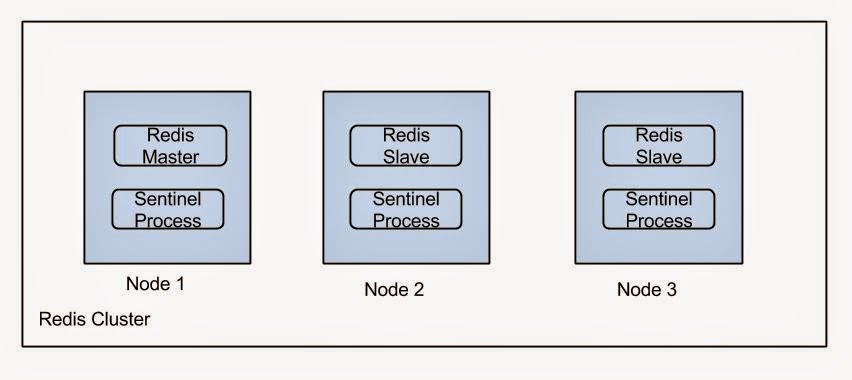
Deploying a HA Redis setup

Image
Sentinel process takes the responsibility of electing a slave as master if a failure occurs. For more information refer  this . Install Redis in each node. Following methods can be used to install Redis. Using Ubuntu repositories.  sudo apt-get install redis-server Manual installation You can download a Redis distribution from this page  http://redis.io/download . Follow the instructions on this page to setup Redis using the downloaded setup  https://www.digitalocean.com/community/tutorials/how-to-install-and-use-redis Set requirepass property to set the password in the configuration file in /etc/redis. Note that this should be same in all nodes. Set Up replication Set the following properties to set replication on slaves. slaveof <masterip> <m...

Bind a remote server's port to a local port

If you have a remote server (say in Amazon EC2) you might want to access a particular port of that server. But there can be situations where it is not that port is not globally open. If you do not want to bother making it globally open you can use it by binding it to a local port of your workstation via ssh. Following command will bind port 9000 of remote machine to your local port 8000.  As an example if it is web server you can easily access it by typing localhost:8000 in your web browser. ssh -L 8000:localhost:9000 username@host

Implementing session timeout in playframework

According to play documentation " There is no technical timeout for the Session. It expires when the user closes the web browser. If you need a functional timeout for a specific application, just store a timestamp into the user Session and use it however your application needs (e.g. for a maximum session duration, maximum inactivity duration, etc.)." So I used the following way to implement a session timeout. Following custom authenticator class was used to implement this. public class ValidateUserSessionAction extends Security.Authenticator{ @Override public String getUsername(Http.Context ctx) { long currentTime=System.currentTimeMillis(); long timeOut=Long.parseLong(Play.application().configuration().getString("sessionTimeout")) * 1000 * 60; String temp=ctx.session().get(Constants.LAST_SEEN_KEY); if (temp == null) { temp = String.valueOf(currentTime); } if((currentTime-Long.parseLong(t...

Optimizing Apache Storm deployment

Recently we happen to run some pretty large Storm topologies in a Storm cluster which runs on Linux. When we running it there were two main issues occurred due to system limitations. First one was logged in Storm logs as, “java.lang.OutOfMemoryError : unable to create new native Thread”. We fixed this problem by increasing the Ulimit  for Storm. Usually storm spawns processes with an user named Storm. So we have to increase the Ulimit for storm user. You can see the ulimits using command "ulimit -u". To increase the ulimits you can follow an approach like this . The second problem was communication link failures between Storm nodes as well as communication link failures between other services (e.g. external APIs, databases, etc). To resolve this problem we had to enable tcp time wait reuse and also we increased the port range for tcp. hat can be done in following manner.  Put these to /etc/sysctl.conf file and issue 'sysctl -f'     net.ipv4.tcp_tw_reus...

Introduction to Play-Framework modules

Play framework inherently support modularization. In other words we can develop play modules and reuse them in different play applications. This article provides a good guide on how to do that. But that is little bit outdated for latest Play distributions. I will describe the changes which is needed to be done to create a play module on latest play versions. Playframework no longer has a play console. Instead of that it uses Typesafe activator. So you need to download activator and add activator to your environment path. You can create boilerplate code for a play app using the  template called Just play java. In my case I needed to create a authentication module. So I created a Play action called auth in controllers package. Then to publish the module go the project directory and issue clean command. Then issue  publish-local command. If it is successful you will get a output like this. [info] published ivy to /home/prabhath/.ivy2/local/authmodule/authmodule_2.10/1.0-SNA...

Add a attachment to CouchDB with play framework JavaAPI

I tired to write a rest API which act as a mediator between clients and CouchDB API. This was done using Playframework's Java API. I wrote the following controller method which takes a POST request which contains file name, content-type and file to be stored as parameters and send as a PUT request to CouchDB. public static Result putAttachment(){ Http.MultipartFormData body = request().body().asMultipartFormData(); Http.MultipartFormData.FilePart picture = body.getFile("picture"); String fileName=null; String contentType=null; File file=null; if (picture != null) { fileName = picture.getFilename(); contentType = picture.getContentType(); file = picture.getFile(); } else { //TODO implement } String restServiceUrl = "http://127.0.0.1:5984/test/a/"+fileName; F.Promise<play.libs.WS.Response> future =play.libs.WS.url(restServic...